


Start monitoring speed from anywhere with our MTL Speed Camera Van, allowing your police department to bring speeding under control on your road network. Operators can either control the camera manually or automatically, issuing fines from a menu at the press of a button.
Features
-
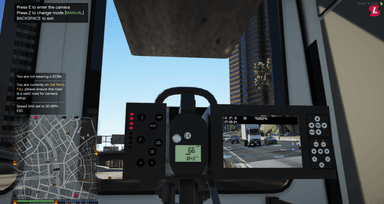
Camera Setup: Easily setup a speed camera from the back seat of the van at any location around the map, allowing you to keep speeding under control for your server.
-
Fine System: Set the fine amount beforehand and issue fines to drivers after detecting their speed, including a scaling mode which increases the fine based on the speed.
-
Integrations: We have support for major billing and banking systems to allow fines to be issued.
-
Custom Van Model: We have a custom MTL speed camera van model included within the resource, with an ELS and Non-ELS version included - both with working emergency lighting.
-
Society Support: We have support for society systems, allowing you to pay fines directly to a society.
-
Warnings: Any drivers passing nearby to a speed camera van will receive an on-screen warning, along with a reminder of the current speed.
-
Manual / Automatic Mode: Easily switch between manual and automatic mode whilst controlling the camera, allowing the camera to automatically detect passing vehicles.
-
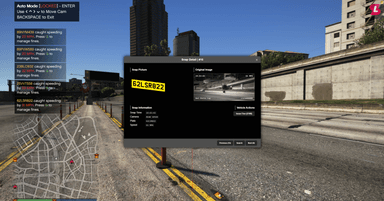
Screen Capture Integration: We have optional support for Screen Capture and Screenshot Basic, meaning photographs will be taken of speeding vehicles and displayed in the menu afterwards.
-
Menu: Our easy to use menu will show all of the vehicles which have been fined by the operator during the current session, allowing them to issue fines at the press of a button.
Compatibility
-
Standalone
-
Ace Permissions
-
QBCore
-
vRP
-
ESX
-
QBX
-
Screen Capture
-
Screenshot Basic
-
mBilling
-
okokBilling
-
okokNotify
-
QB Boss Menu
-
QB Management
-
ESX Addon Account
-
okokBanking
-
QB Banking
Documentation & Support
The documentation for this resource can be viewed here and our support team are available to help daily with any questions or assistance needed here.