
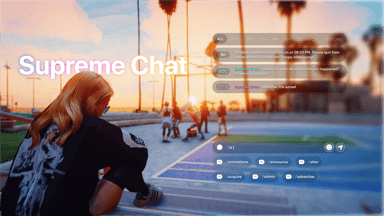




Supreme Chat — A modern, fully customizable chat system for FiveM roleplay servers.
Supreme Chat is a complete chat replacement built for serious roleplay servers. It combines proximity-based messaging, mask anonymity, overhead floating messages, dispatch and gang channels, and a full in-game settings panel with live preview into a single polished resource. Every element is player-configurable with themes, drag-and-drop positioning, and per-channel color customization.
FEATURES
- Modern Chat Interface — Clean, minimal design with glassmorphism blur and smooth animations. Three theme modes: Light, Dark, and Dynamic (auto-switches based on in-game time of day). Fully customizable accent color and per-channel colors through an in-game settings panel.
- 8 Pre-Configured Channels — ALL, OOC, ME, DO, PM, SERVER, DISPATCH, and GANG out of the box. Each channel has its own command, color, placeholder, permissions, and proximity rules. HISTORY tab for reviewing past messages. All channels can be enabled, disabled, or reconfigured independently.
- Proximity Messaging — /me and /do messages respect a configurable distance (default 5m). OOC can be set to global or local. Server-side distance checks prevent spoofing. Each command has independent proximity settings.
- Dispatch Channel — Job-restricted tab for emergency services. Custom job tags per faction (PD, EMS, etc.) with colored pills and dynamic badges. Badge generator function lets you pull call signs, rank numbers, or any custom value per message. Tab automatically hidden from non-allowed jobs.
- Gang Channel — Faction-only chat restricted by both job and gang membership. Each gang can have its own tag colors, badge configuration, and visibility rules. Only faction members see their own gang's messages — Ballas never see Vagos traffic and vice versa.
- Mask Anonymity — Players wearing a mask automatically appear as ANONYMOUS in chat. Configurable drawable whitelist with 120+ non-mask props pre-mapped. Preserves immersion during crimes and concealed-identity roleplay. Works across all channels including PM and dispatch.
- Overhead Floating Messages — /me and /do messages float above the character's head for 10 seconds. Visible within 5m with line-of-sight checks. Automatically hides behind walls and vehicles. Messages follow the character as they move.
- Typing Dots Indicator — Three animated dots appear above a player's head while they compose a ME or DO message. Only visible within 5m with clear line-of-sight. Per-player toggle in settings. Configurable dot size and color.
- Drag and Drop Placement Editor — Visually reposition, resize, and fine-tune the chat UI in-game. Grid snap toggle, free-form scale slider, and revert-to-default option. Right-click context menu for quick actions. Changes saved per player to the database.
- In-Game Settings Panel — Open with /chatsettings. Full UI with live preview for theme, chat size, visibility mode, blur, sound effects, typing dots, accent color, and per-channel colors. Every setting persists per player across sessions, character switches, and reconnects.
- Chat Size Presets — Five preset sizes (XS, S, M, L, XL) plus fine-tune scale slider for precise control. Each player picks their own size from the settings panel.
- Chat Visibility Modes — VISIBLE (always on screen), ON_INPUT (appears on new message then fades), or HIDDEN (only visible when opened with T). Each player selects their preferred mode.
- Theme System — All chat elements support Light, Dark, and Dynamic themes. Dynamic automatically switches based on in-game time of day, matching the same day/night logic as Codem HUD for a unified visual experience across resources.
- Private Messages — /pm direct messaging between players by server ID. Sender sees a copy in their PM tab for tracking. Prevents self-PM and offline targeting with proper error notifications.
- Admin Commands — /server for server-wide admin announcements, /clearall to clear every player's chat globally, /clear for per-player clearing. Permission checks honor god, superadmin, admin, group permissions, and ACE command permission.
- Auto Messages — Scheduled recurring server-wide messages on a configurable interval. Rotates through a message list automatically. Perfect for rules reminders, Discord invites, or event announcements. Skips broadcast when no players are online.
- Discord Webhook Logging — Every chat command can be logged to a Discord webhook with player name, command, message content, and timestamp. Toggle on/off server-side. Logs every built-in command (OOC, ME, DO, PM, Server, Dispatch, Gang).
- Emoji Picker — Built-in emoji picker with search functionality and recent-history tracking. Accessible through the chat input.
- Per-Player Settings Database — All player preferences (theme, position, size, colors, accent, channel colors) saved to MySQL keyed by license identifier. Settings persist across character switches, server restarts, and reconnects. Automatic table creation on first resource start — no manual SQL import required.
- Multi-Language Support — English, Turkish, German, French, Spanish, and Portuguese locale files included. All UI text, notifications, and system messages fully translatable.
- HUD Integration Exports — GetSettings, UpdateSettings, and GetRestrictedChannels exports let external HUD resources sync theme, colors, and channel visibility with the chat. Two-way sync between chat and HUD for a unified player experience.
- Standard FiveM Chat Events — Drop-in replacement for the default chat. All standard events (chat:addMessage, chat:addSuggestion, chat:removeSuggestion, chat:clear) fully supported. Any resource using these events works without modification.
- Performance Optimized — Idle resmon near 0.00ms. Adaptive thread sleep intervals so background loops only run when typing indicators or overhead messages are actively in use. Minimal DOM updates and efficient NUI messaging.
FRAMEWORK SUPPORT
QBCore (Old and New)
QBox
ESX Legacy
ESX Modern
STANDALONE